Create the "Purpose" Mini Directory
NEOS uses Mini Directories to store the reusable picklists that appear throughout the application. The Purpose Mini Directory defines the reasons a call or intake can exist — for example, a brand-new lead, an existing client, or spam.
Reflekt Legal reads the Purpose values when it logs a call so every interaction is classified consistently. Setting up these values up front keeps your reporting clean and makes sure each call is routed and tracked correctly.
What the Purpose Mini Directory Controls
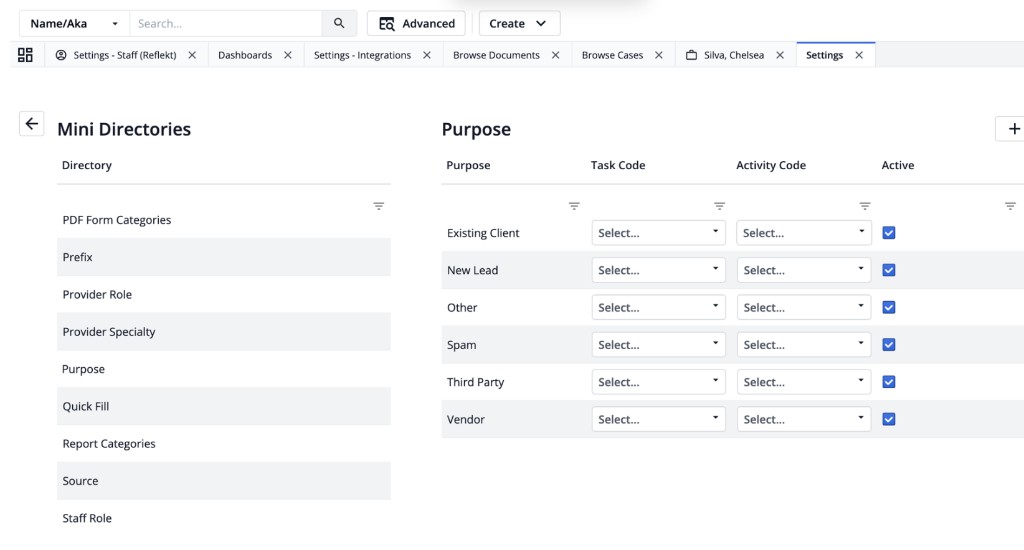
Each row in the Purpose Mini Directory is a selectable purpose with the following fields:
- Purpose — the label shown to staff and used by Reflekt Legal (for example,
New Lead). - Task Code — an optional code that maps the purpose to a NEOS task type.
- Activity Code — an optional code that maps the purpose to a NEOS activity type.
- Active — whether the purpose is available for selection. Leave this checked for any purpose you want Reflekt Legal to use.
Prerequisites
Before you begin, make sure you have:
- Administrator access to NEOS (you need rights to edit firm settings and Mini Directories).
- Completed the NEOS Integration setup, or have it in progress.
Step 1: Open the Purpose Mini Directory
- Sign in to NEOS as an administrator.
- Go to Settings.
- Open Mini Directories.
- In the Directory list on the left, select Purpose.
The Purpose table opens on the right, showing the existing purposes and their Task Code, Activity Code, and Active columns.
Step 2: Add the Purpose Values
Reflekt Legal works best when the following purposes exist. Click the + button in the top-right of the Purpose panel to add each one, then make sure Active is checked.
| Purpose | When it applies |
|---|---|
| New Lead | A first-time caller or prospective client who is not yet in NEOS. |
| Existing Client | A current or former client who already has a case or contact record. |
| Vendor | A supplier, service provider, or business partner. |
| Third Party | A caller related to a matter who is not the client (for example, an adjuster or opposing party). |
| Spam | An unwanted, robocall, or solicitation contact. |
| Other | Anything that does not fit the categories above. |
Use these exact labels. Matching the purpose names Reflekt Legal expects keeps call logs and reporting consistent without any extra mapping.
Resources
If you need help configuring your Mini Directories, contact [email protected].